User guide

Kagami Manual

Get set up in minutes — here's everything you need to know about your Kagami earbuds.

The first time you use Kagami, follow these six steps in order.

Photo coming soon

Unboxing the Kagami charging case and earbuds
Step 1 — Unbox & chargeTake Kagami out of the case and give it a full charge before first use.
Photo coming soon
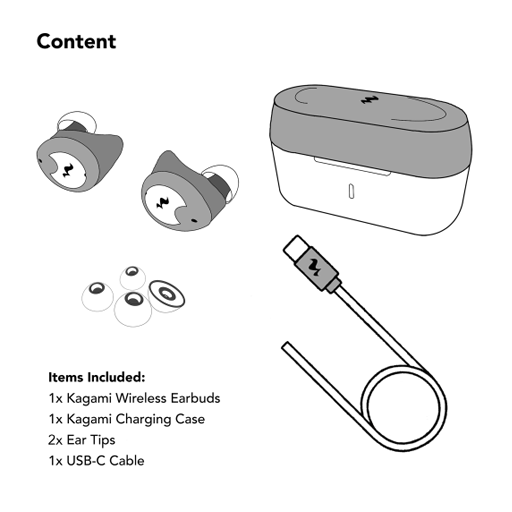
What's included in the box
Step 2 — Here's what's included in the boxTake out the earbuds, charging case, spare ear tips, and USB-C charging cable.
Photo coming soon
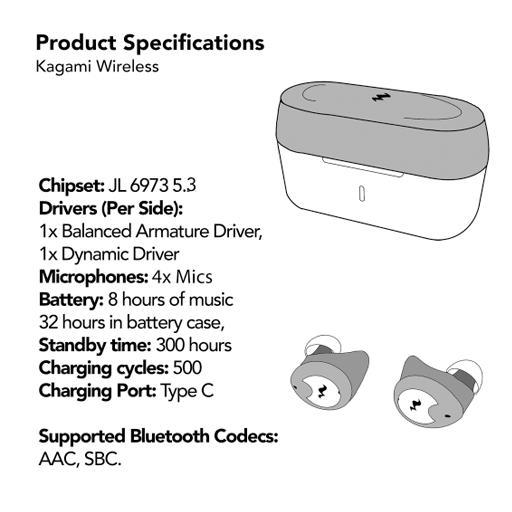
Earbuds specifications
Step 3 — Specifications you should know aboutKagami pairs a 10mm titanium driver with a balanced armature, weighs 4.8g per earbud, and runs up to 40 hours on a single charge with the case.
Photo coming soon
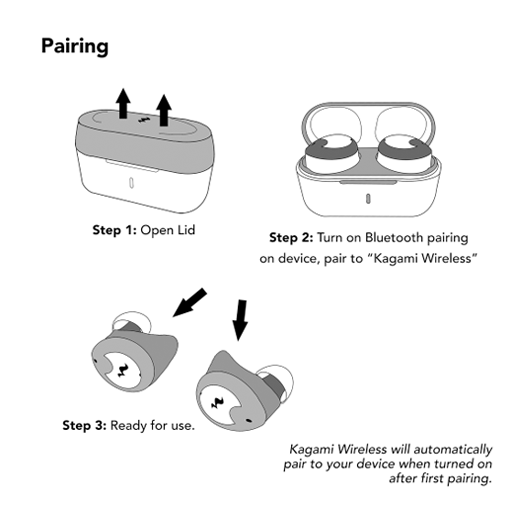
Pairing bluetooth
Step 4 — PairingRemove earbuds from case and connect via Bluetooth to Kagami Wireless
Photo coming soon
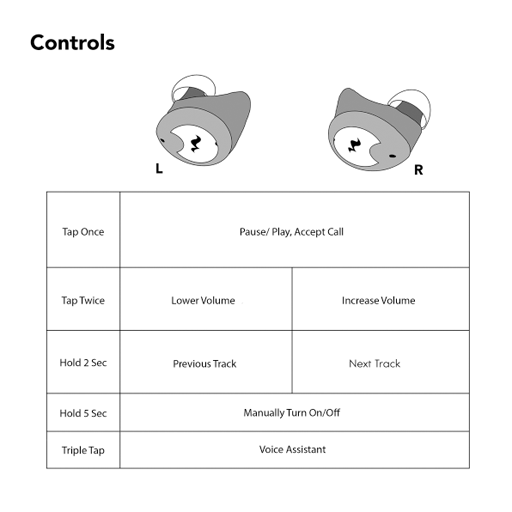
Adjust volume or change song
Step 5 — ControlsTap on your earbuds to adjust volume or change song
Photo coming soon
Listen to your favorite song
Step 6 — EnjoyListen to your favorite song.

Still stuck? Our team is happy to help — reach out on the Contact page.